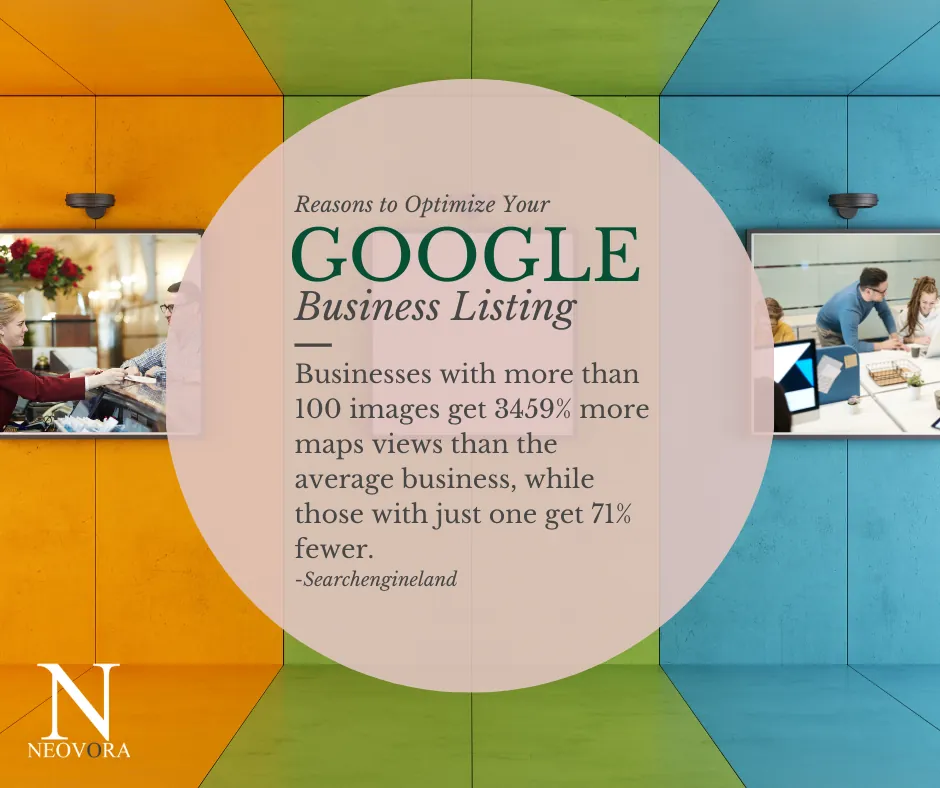
When somebody in your town searches for what you do, the first thing they see often isn't your website. It's your Google listing: your name, your hours, your reviews, your photos and a button to call you.
That listing is your Google Business Profile. It used to be called Google My Business, and it's free. Anybody can set one up. But a listing that's half filled out tells a customer very little, so it's worth doing properly.
Here's how many people are looking:
- 3.5 billion Google searches are made every day (Internet Live Stats).
- The number of Google searches grows by roughly 10% every year (Internet Live Stats).
- 90% of searches made on desktop computers are done on Google (Statista).
- Half of all people who did a local search on their phone visited that store the same day (Jotform).
- 63.6% of people are likely to check a business' Google reviews before they visit (ReviewTrackers).
- Only 61% of local businesses have even claimed their Google listing.
For more numbers on how many people search Google, a company that sells search ad software keeps a list of Google search statistics.
How to set up your Google Business Profile
Claim and verify your listing
Google may already have a listing for your business, built from what it found online. Claim it, so you're the one who decides what it says.
Then Google has you prove the business is real. For years that meant waiting up to five business days for a postcard with a code on it. Google now shows you which ways your business can verify, and Google's help pages walk you through the claiming steps.
Until you're verified, there's a lot you can't do, including answering your reviews. Once you are, go through every detail on the listing and make sure it's right.
Pick your categories
Your categories tell Google what kind of business you are. Make the one that best describes your main work your primary category, then add the others that honestly fit the rest of what you do. Skip any that are a stretch, because the customer who finds you through one expects you to do that work.
Write your business description
The description is a short paragraph on your listing where you say what you do. Most businesses fill it with the same words: quality work, fair prices, years of experience. Use yours to say what you do, where you do it, and the words your customers use when they search for it.
Know who your best customers are and why they picked you before you write it. That's what market research is for.
Fill out everything else
Fill in every field Google gives you, and keep it current. Hours are the easy one to forget, especially around holidays. A customer who drives over on a holiday and finds you closed, on a day your listing said you were open, remembers it.
Ask for reviews, and answer every one
Your happy customers are the people to ask, and the best time is while the job is still fresh. Then reply to every review you get, good or bad.
Thank the people who left good reviews. Thank the people who left bad ones, too, because a bad review can put a new customer off. A calm reply that says what you're changing shows the next customer how you handle a problem, and sometimes it brings the unhappy customer back. Answer each review on its own, because that person took time out of their day to write about you.
How to tell whether your listing is working
Google shows you numbers for your listing: how many times it was seen, where it was seen, and how many called, asked for directions or clicked through to your website. Google has called this screen Insights and, more recently, Performance.
Don't expect much at first, because a new listing starts near zero. Check back as you fill it out and collect reviews, and see what changed.
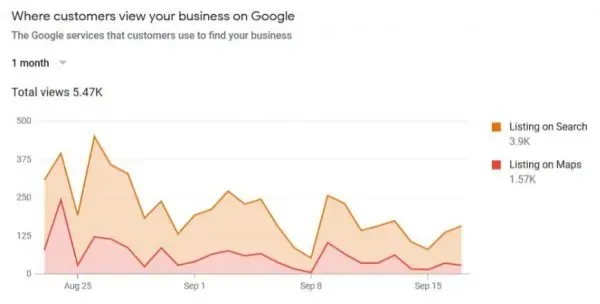
Here's what one part of that screen showed for two different businesses over one month: where each listing was viewed, on Google Search or on Google Maps.
A home service business
A retail store
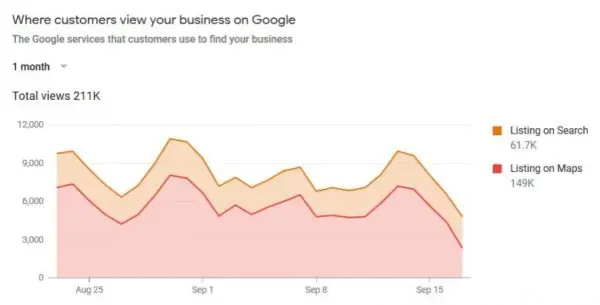
Look at the split. The home service business got about 3.9K of its 5.47K views on Search. The retail store got about 149K of its 211K views on Maps. Every business splits differently, so your own numbers tell you where your customers are looking for you.
Google's numbers also count the calls, but they can't tell you whether anybody followed up on one.
What happens after customers find you
A good listing helps people find you. After that, it's up to your office: the quote that gets chased, the missed call that gets a text back, the happy customer who gets asked for a review before they drive off.
That's what your automations are for. Once we build them, each of those goes out on its own, so nobody has to remember it.